
What businesses actually need from an Adobe PDF editor (beyond “edit text”)
Most teams don’t struggle because they can’t open a PDF. They struggle because PDFs become process bottlenecks.
A business-ready Adobe PDF editor needs to cover five jobs exceptionally well:
- Editing and assembling documents quickly
Updating text and images, reorganising pages, adding comments, redacting sensitive info, comparing versions, and keeping formatting stable. Businesses want edits that don’t wreck layout or fonts, basically. - Secure collaboration (without losing version control)
Centralised review, consistent feedback, and fewer “which file is final_FINAL_v7.pdf?” moments. It sounds silly, but it costs time and it creates mistakes. - E-signatures that don’t feel bolted on
Signing and requesting signatures, plus reusable templates for the documents you send all the time. The best setups make signatures feel like part of the workflow, not a separate app. - Governance for IT and compliance
Licence management, user access, and identity controls (especially for growing teams). This is the bit that makes procurement, IT, and compliance breathe easier. - Speed: turning documents into decisions
Summaries, insights, and quick extraction of “what matters” from long documents. A big win is when answers can be traced back to the source pages, so nobody is relying on guesswork.

What Adobe Acrobat Studio is, in practice
At a functional level, Acrobat Studio is designed as a hub that combines:
- the productivity of Adobe Acrobat
- content creation tools from Adobe Express
- and AI Assistants that help you work through document-heavy tasks
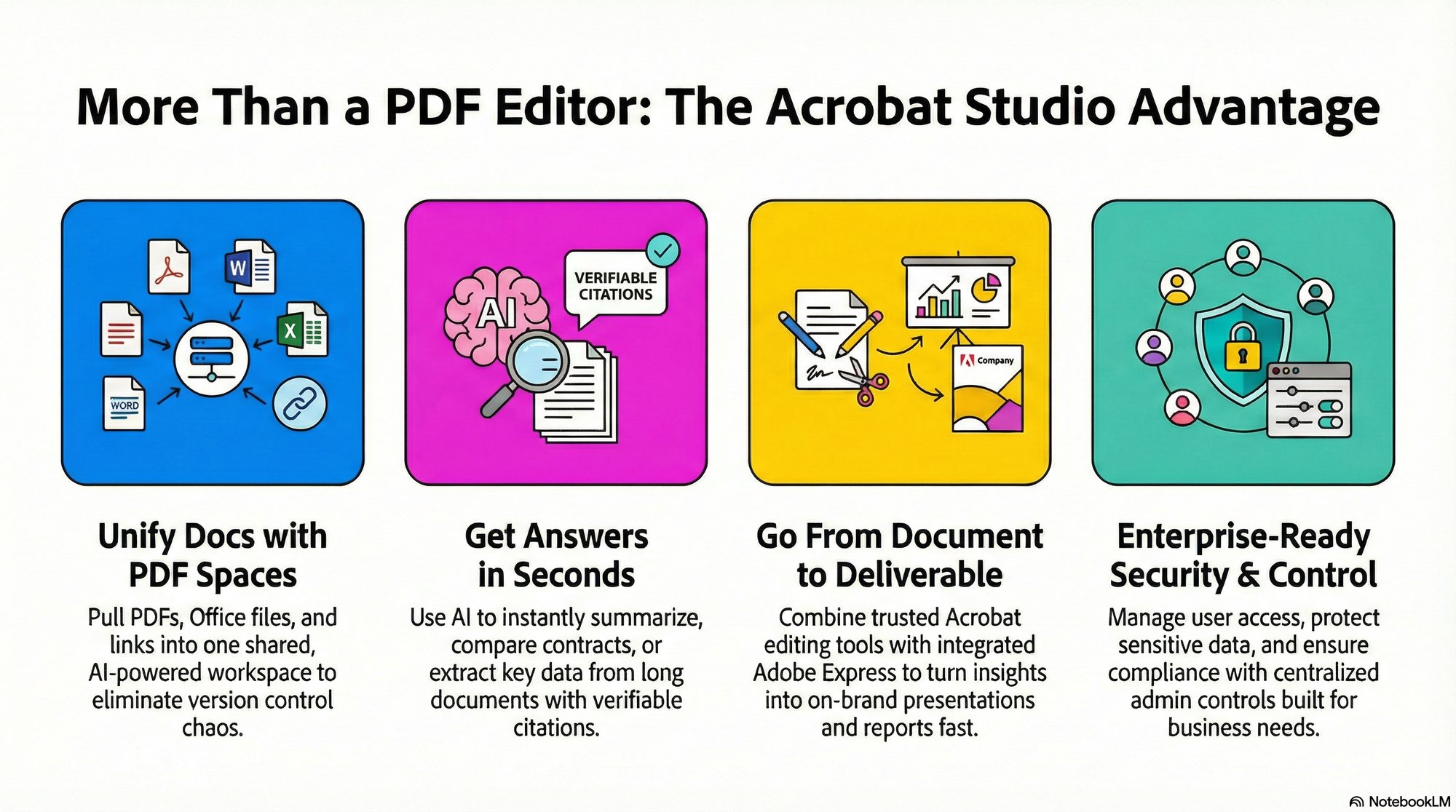
For businesses, the feature you’ll hear about most is PDF Spaces: AI-powered workspaces where you can pull together PDFs and other sources, ask questions, generate insights, validate answers with citations back to the documents, and share the workspace with colleagues (and sometimes customers or partners).
It’s Adobe saying: stop treating documents like inert files. Turn them into a workspace.
And importantly for this article’s keyword: Acrobat Studio still includes the familiar Acrobat Pro capabilities people expect from an Adobe PDF editor, but wraps them with collaborative spaces and integrated creation tools.
Why Acrobat Studio matters for businesses (the tangible benefits)
1) PDF Spaces turns scattered docs into one shared “source of truth”
In normal business life, information is scattered across:
- PDFs
- Office docs
- shared links
- meeting notes
- emails that nobody can find again
PDF Spaces is built to pull multiple items into one workspace. That matters because most “document mistakes” aren’t editing mistakes - they’re context mistakes. People don’t have the same version, they didn’t see the same clause, they missed the same attachment. A shared space fixes that structurally.
2) A faster way to get answers (with evidence)
AI features in document tools can be either genuinely helpful or a total distraction. The best version is where outputs are traceable back to what’s in the file, so you can trust it and double-check quickly.
In practice, this helps when you need to answer questions like:
- “What are the termination terms across these three supplier contracts?”
- “Pull out every SLA metric and put them in a summary.”
- “What’s the pricing difference between these proposals?”
- “Where does this policy mention remote working exceptions?”
3) It’s still an Adobe PDF editor at the core (meaning: you can finish the job)
A lot of “smart” document platforms are great at insights, but then clumsy at the basics. Acrobat Studio’s value is that you get the Acrobat tools people already trust, plus the newer AI and collaboration layer.
So once you’ve found the right clause or decided what needs changing, you can still:
- edit content,
- organise pages,
- comment and review,
- redact,
- protect the file, and more.
That combination is what makes it feel like a business tool rather than a novelty.
4) Built-in security and compliance features (the stuff procurement asks about)
Most businesses can’t use random tools for sensitive docs - they need security controls that are easy to explain in a risk review.
With a proper Adobe PDF editor setup, you’re generally looking at things like:
- password protection and permissions
- controlled access and sharing
- encryption options
- redaction for sensitive information
- accessibility support (important for a lot of organisations, especially public sector)
5) Adobe Express Premium included - turning PDFs into on-brand outputs fast
This is the quiet business advantage people overlook.
Acrobat Studio is designed to connect document work with creation tools and templates, so teams can move faster from “document” to “deliverable”.
For businesses, that creates a powerful workflow:
- take a proposal / report / briefing PDF,
- summarise or extract key points,
- then remix into a presentation or branded one-pager quickly.
It’s particularly strong for:
- sales enablement packs,
- board summaries,
- internal comms,
- client updates that need to be seen, not just read.
6) Better collaboration (including with external stakeholders)
If your business works with agencies, partners, or clients, document collaboration gets complicated fast.
Moving from “email attachments” to “shared workspaces” usually reduces accidental leaks and confusion. It also helps keep feedback and approvals in one place, which is half the battle.
7) IT admin control: licences, access, and SSO
For growing teams, software management is half the battle.
A business-friendly rollout typically needs:
- centralised licence management
- user provisioning and deprovisioning (leavers lose access quickly)
- identity controls like Single Sign-On (SSO) where required
That’s the stuff that makes rollouts succeed: the right people get access, leavers lose access, and you’re not managing licences with sticky notes.
8) It works with tools businesses already live in
Most teams don’t want another “island app”. They want their document tool to show up where work already happens.
If your organisation relies on Microsoft 365, cloud storage, and shared collaboration channels, integrations matter because they reduce friction. Less friction means more adoption, and more adoption means fewer ad hoc side workflows.
Everyday business workflows using Adobe Studio + an Adobe PDF editor mindset
Here are a few very normal scenarios where Acrobat Studio helps, without needing the whole company to become “PDF nerds”.
Sales: proposals that move faster
Old way: proposals live in PDFs, changes happen in email, and nobody can find the latest pricing table.
With Acrobat Studio: a PDF Space holds the client brief, brand notes, past proposals, pricing sheets, and competitor info. Your team uses AI to pull differences and key objections, then uses creation tools and templates to generate polished slides or one-pagers.
Result: fewer delays, more consistency, and less time wasted on formatting and hunting for facts.
HR: onboarding packs that don’t break every month
HR docs are full of little changes: policy updates, forms, signatures, regional variations.
With an Adobe PDF editor workflow in Acrobat Studio:
- you keep shared templates for standard docs (handy for repeated signature requests),
- you manage access centrally,
- and you reduce “which version did they sign?” drama.
It also helps HR teams keep brand and tone consistent across regions, which sounds minor until you’re scaling.
Legal and compliance: review with context, not panic
Contracts aren’t hard because they’re long - they’re hard because they’re long and people are rushed.
A shared workspace plus AI-assisted navigation can reduce the time it takes to find the key clauses, compare versions, and surface risks for review. And because it’s still a full Adobe PDF editor underneath, legal teams aren’t blocked when it’s time to mark up, redact, or lock down files.
Finance and procurement: compare vendors without losing your mind
Procurement decisions often involve multiple long proposals. The pain is always the same: important terms are buried, and each supplier writes things differently.
A shared workspace approach helps centralise those proposals and compare what matters - payment terms, renewal clauses, implementation timelines, SLAs. Then the summary can be turned into a decision pack quickly, instead of a two-day manual copy-paste exercise.
FAQ: Adobe PDF editor + Acrobat Studio for business
Difference between Adobe PDF editor and Acrobat Studio
“Adobe PDF editor” is the role (editing PDFs), and Acrobat is the core toolset. Acrobat Studio adds workspaces, AI-assisted document understanding, and integrated creation tools so teams can move from document to deliverable faster.
Handling more than PDFs
Yes - the idea is that you can bring together PDFs plus other relevant sources (like files and links) into one workspace, so the context lives in the same place as the document work.
Suitability for regulated industries
It’s commonly used in environments where security, permissions, and controlled document workflows matter. The key thing is that you can standardise one approach across departments rather than relying on random tools.
Central user management
Yes - for business use, central management is a core expectation, especially once you have multiple teams and roles.
What is Acrobat Studio and how is it different from Acrobat Pro?
Acrobat Studio is framed as a modern work hub that brings together Acrobat’s core PDF capabilities, AI Assistants, and Adobe Express creation tools in one connected workflow. Acrobat Pro focuses on the trusted “do the PDF job” essentials - editing, commenting, organising pages, redacting, and protecting files. Studio keeps that foundation, then adds shared workspaces (PDF Spaces) and AI-assisted document understanding so teams can move faster from documents to decisions.
What can an Adobe PDF editor in Acrobat Studio do beyond editing text?
A business-ready Adobe PDF editor needs to handle far more than text tweaks. In many workflows, you need stable formatting while you reorganise pages, compare versions, add comments, and redact sensitive information. You also need built-in e-signatures, file protection, and collaboration that doesn’t create “final_final_v7” chaos. Acrobat Studio preserves those Acrobat fundamentals, then adds shared spaces and AI support on top.
How do PDF Spaces reduce version control problems in team projects?
PDF Spaces are built to gather related PDFs and other sources into a single shared workspace. Instead of digging through emails, links, and folders, teams review and discuss in one place. That helps reduce context errors, like missing an attachment or working from the wrong version. It also makes approvals and feedback easier to track, especially when multiple stakeholders are involved.
How does the AI in Acrobat Studio help with summaries and decision-making?
The practical win is speed with traceability. In a typical workflow, you can ask questions across a document pack, generate a summary, and then validate what the tool returns against the source pages. That’s helpful for locating key clauses, pulling out SLA metrics, or comparing proposals without manual copy-paste. It helps stakeholders reach “the answer” faster, backed by evidence rather than guesswork.
Does Acrobat Studio support secure collaboration and compliance needs?
Acrobat Studio is positioned for business use where security and governance matter. Common controls include password protection, permissions, encryption options, and redaction for sensitive content. For IT and compliance, it also points toward central licence and user management, plus identity controls like Single Sign-On (SSO) where needed. This makes it easier to standardise document workflows instead of relying on scattered tools.
Acrobat Studio makes the Adobe PDF editor feel like a business workspace, not just a tool
If you only need to tweak a PDF once in a while, basic online tools might be enough.
But if your business runs on documents (and most do), Acrobat Studio matters because it upgrades the whole lifecycle:
- Create / edit with trusted Acrobat tools
- Collaborate in a shared workspace
- Extract insights faster with AI-assisted understanding
- Remix content into branded outputs with templates
- Secure + govern with central admin control
Contact our experts today to discuss Adobe Solutions